- 環境
- 構成
- central database(central.example.com)
- store and forward proxy(proxy.example.com)
- headless data collector(slave.example.com)
- ダッシュボード
- バックエンド(graphite + grafana)
Central netdata is here!
This is the first release that supports real-time streaming of metrics between netdata servers.
新しい機能としてstream機能が追加されました。以降に設定例を記載します。
streamにおける役割は以下の通りです。
- headless data collector (collect and stream metrics in real-time to another netdata)
- headless proxy (collect metrics from multiple netdata and stream them to another netdata)
- store and forward proxy (like headless proxy, but with a local database)
- central database (metrics from multiple hosts are aggregated)
環境
# cat /etc/centos-release
CentOS Linux release 7.3.1611 (Core)
構成
ここでは、例として以下の構成を試します。
+-----------+     +-----------+     +-----------+
|   slave   | --> |   proxy   | --> |  central  |
+-----------+     +-----------+     +-----------+
| hostname | slave.example.com | proxy.exmaple.com | central.example.com |
|---|---|---|---|
| role | headless data collector | store and forward proxy | central database |
| dashboard | disabled | enabled | enabled |
| alarms | disabled | disabled | enabled |
| send to backend | - | disabled | enabled |
データを送るだけのホストとプロキシ機能を提供するホスト、すべてのデータを表示管理するホストの構成です。
central database(central.example.com)
# uuidgen
31a8d192-9999-0000-1111-75c71f62b7b7
stream.conf
[31a8d192-9999-0000-1111-75c71f62b7b7]
    enabled = yes
    default history = 3600
    default memory mode = ram
    health enabled by default = auto
streamのマスターホストとしての設定です。
uuidgenコマンドでAPI_KEYを設定ファイルのセクションとして登録します。
netdata.conf
[backend]
        enabled = yes
        data source = average
        type = graphite
        destination = localhost
        prefix = netdata
        hostname = central.example.com
        update every = 10
        buffer on failures = 10
        timeout ms = 20000
バックエンドの設定です。ここでは、バックエンドのタイプにgraphiteを選択しています。
バックエンドの設定は以下をご確認ください。
store and forward proxy(proxy.example.com)
# uuidgen
61d437b-3333-4444-5555-0aeebfd8dc7c
stream.conf
[stream]
    enabled = yes
    destination = central.example.com
    api key = 31a8d192-9999-0000-1111-75c71f62b7b7


[d61d437b-3333-4444-5555-0aeebfd8dc7c]
    enabled = yes
    default history = 3600
    default memory mode = ram
    health enabled by default = no
マスターとスレーブ双方の機能を有効にします。[stream]セクションでは、スレーブ機能を有効にしています。
netdata.conf
[global]
    memory mode = ram

[health]
    enabled = no
[health].enabledをnoとして、アラーム機能を無効化しています。
headless data collector(slave.example.com)
stream.conf
[stream]
    enabled = yes
    destination = proxy.example.com
    api key = d61d437b-3333-4444-5555-0aeebfd8dc7c
スレーブ機能のみの設定です。[stream]セクションで有効化します。
netdata.conf
[global]
    memory mode = none

[health]
    enabled = no
[global].memory modeをnoneとして、ダッシュボード機能を無効化しています。
ダッシュボード
スレーブホストのメトリクスはマスターホストのダッシュボードから以下のURLでアクセスできます。
http://<master hostname>:19999/host/<slave hostname>/

http://central.example.com:19999/にアクセスすると、my-netdataから3つのホストへのリンクが確認出来ます。
また、http://proxy.example.com:19999/では、2つのホストが確認できます。
バックエンド(graphite + grafana)
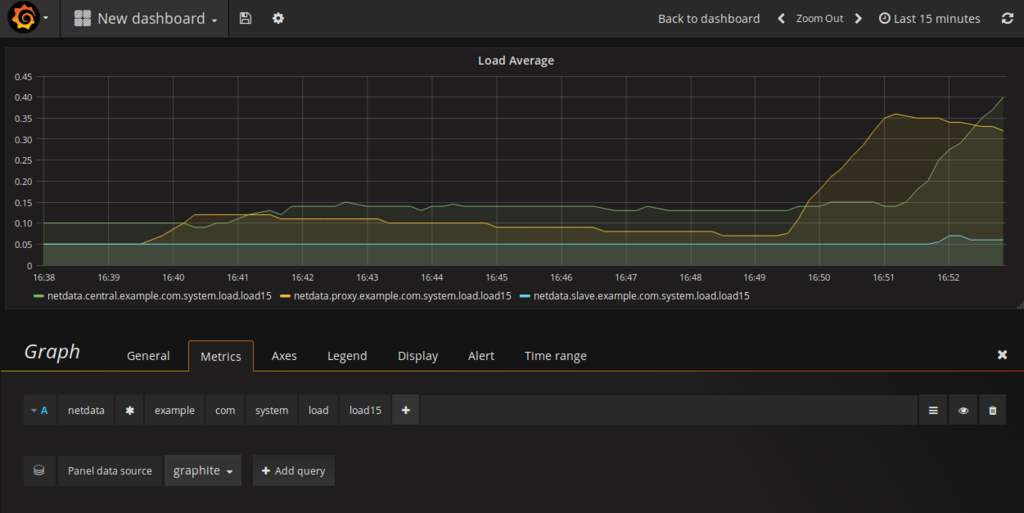
3ホストのロードアベレージ(15分)を表示させてみました。
